Place an inventory item
The first crew table is the worked example. Enter Decorator using its on-screen control, open Inventory and select the table. Position it, use Place and then Finish to return to walking mode. The observed controller layout also shows Rotate while an item is being placed.
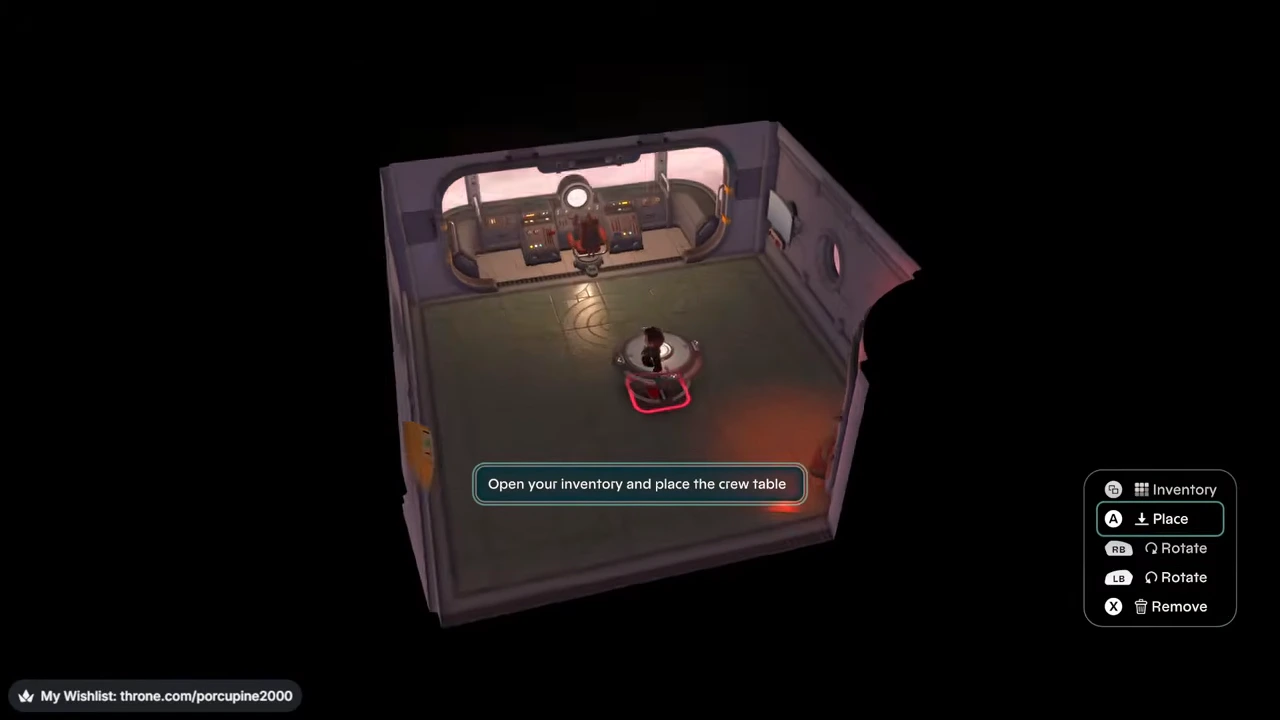
Withdraw stored furniture first
The map station starts in the cargo hold. Open the wall hatch and withdraw it, then return to Decorator to place it. Moving an item from cargo into the backpack does not itself put furniture in the room.
Use the furniture after finishing
Once back in walking mode, approach the table and use its interaction. The crew table opens requests; the map station opens navigation. Their complete setup and first trip are in the departure route.
A small room plan
Put the table where its interaction point is easy to approach, and keep the hatch visible. This is an editorial layout suggestion. No collision clearance, item refund or relocation cost has been measured.
Footage and controls
Uploaded September 1, 2026; titled 1.0. Platform/build unverified. Match the pictured controller prompts to your controls.